
Review Innovations

The RIght Choice!

WE’RE HERE TO HELP

Get in Touch


Have questions about our review programs, schedules, or branch locations? Whether you are preparing for the Civil or Geodetic Engineering board exams, our team is here to assist you every step of the way toward passing and topping the boards.

NATIONWIDE PRESENCE

Where to Find Us

Visit us at any of our physical branches or join our online review sessions from anywhere in the Philippines. Our full-time faculty rotates across locations to ensure every student enjoys access to premier board exam preparation.


RI Manila (Main Office)

RI Baguio (Grotto)

RI Baguio (Assumption)

RI Cebu

RI Davao

Follow Us


Still have questions?

Send us a direct message using the inquiry form on this page or call your nearest branch!

FAQ


We offer a structured, progressive program engineered to build your mastery from the ground up:

  • Review Course (Concept & Skill Building): This phase focuses on thorough concept mastery. Our expert instructors walk you through fundamental principles, theory, and extensive sample problems in 2-hour lecture sessions.
  • Refresher Course (Exam Application & Speed): Taking place after the review course, this phase puts your knowledge into action under simulated board exam conditions. Each 2-hour session consists of a 1-hour test followed immediately by a 1-hour detailed solution breakdown. (Note: Refresher classes are offered strictly in either full Face-to-Face or full Online modalities, without a hybrid schedule.)

Enrolling is simple and straightforward! Follow these steps to secure your spot:

  1. Pay the Registration Fee:
    Pay the required registration fee (or full payment if preferred) and save a copy of your payment slip or deposit receipt
    .


  2. Prepare Your Requirements:
    Before opening the online registration form, please gather the following:

    • Proof of Payment (Deposit slip or online transfer receipt).

    • Gmail Account linked to Microsoft Authenticator (used to set up your official MS Teams learning portal).

    • ID Picture for your official student identification card.

    • Accomplished Letter of Undertaking (Download Form Here) .

    • Agreement for Free Tuition Privilege (if applying for special privileges) (Download Form Here) .


  3. Submit the Registration Form: Fill out the Google Registration Form and upload your documents.

To guarantee a smooth and fast verification process, please note our payment guidelines:

  • Preferred Payment Method: Over-the-counter deposit using a Metrobank payment slip (helps us verify your payment fastest!).
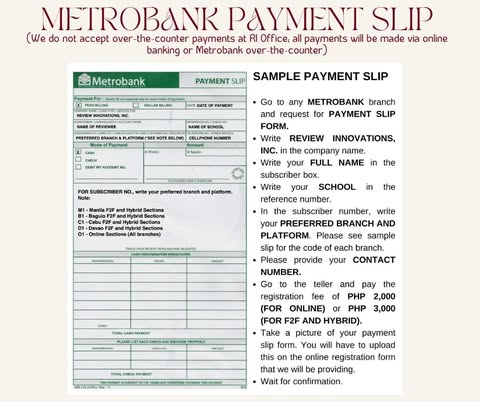
  • No In-Office Cash Payments: We do not accept over-the-counter payments directly at our branch offices.

  • Alternative Online Option: If you do not have a Metrobank branch nearby, you may send your payment via online bank transfer, GCash, Maya, or GoTyme.
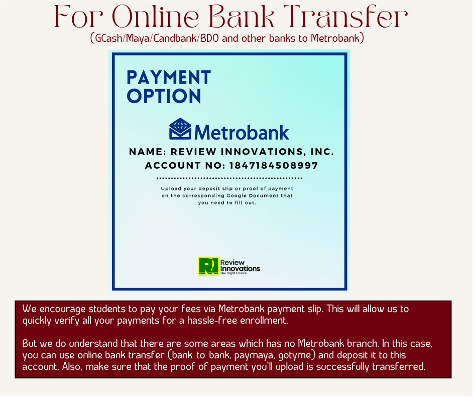
  • Proof of Payment: Always ensure you upload a clear screenshot or receipt showing a successful transaction when submitting your registration.

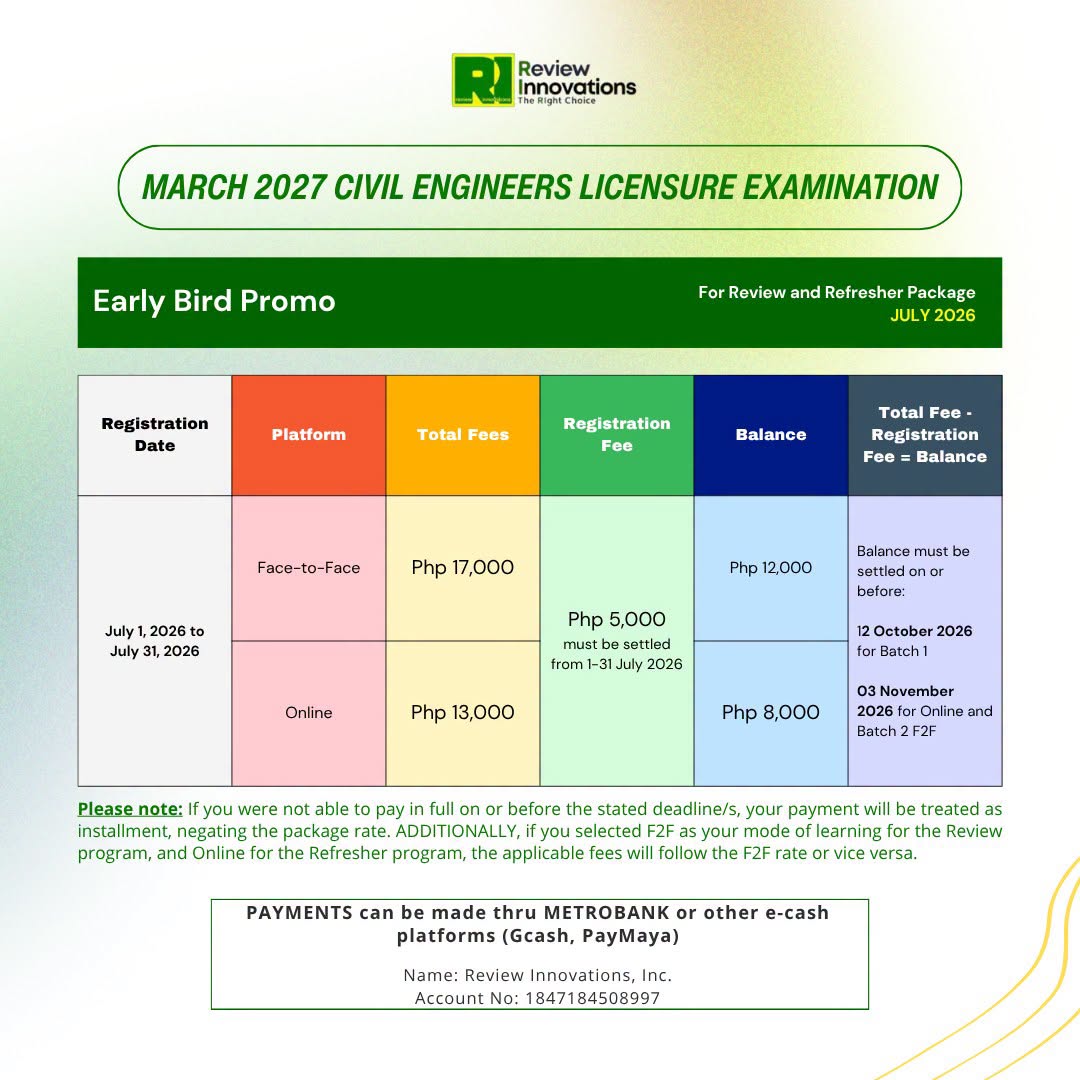
Our tuition fees vary depending on the course (Review Course or Refresher Course) and your preferred learning modality (Face-to-Face or Online Review).

  • Standard Downpayment / Registration Fee: You may pay the initial registration fee to reserve your slot, or pay the tuition in full upon enrollment.
  • Discounts: We offer special rates for early bird enrollees, honor graduates, and former RI reviewees.

View Latest Fee Structure & Schedule:

  • You can check our latest official announcement and detailed rate breakdown directly on our Official FB post.
LINKS

  • Register here: Google form
  • All information and details on enrollment process and fees are uploaded here: Google drive

PAYMENT via METROBANK

  • Name: Review Innovations, Inc.
  • Account No: 1847184508997

NOTE: Can be paid through e-payment platforms like Gcash and MAYA; or bank-to-bank transfer with a fee.

Upon submitting your registration form, you will instantly receive an auto-generated email confirmation.

Once our office staff manually verifies your payment and assigns you to your official section and branch, you will receive an official invitation via Microsoft Teams. Simply click Accept in that email to access your team and learning materials.

  • Tip for Face-to-Face enrollees:
    You may also reach out directly to your assigned branch office staff for immediate assistance or status verification.